Agents
Talk to agents, watch what they do and steer them while they work.
Workspace chat
Screenshot from Goodboy 0.21.1
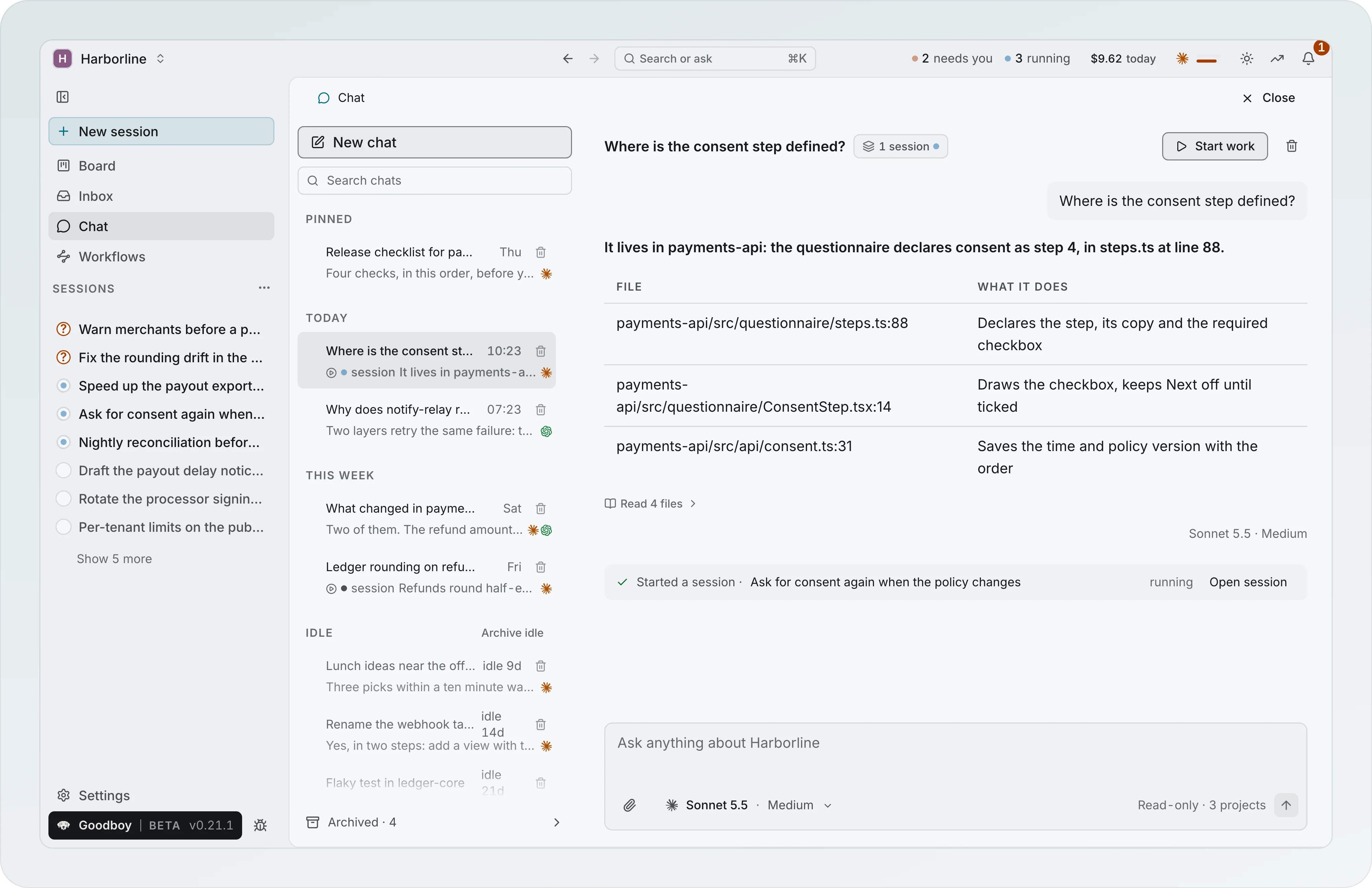
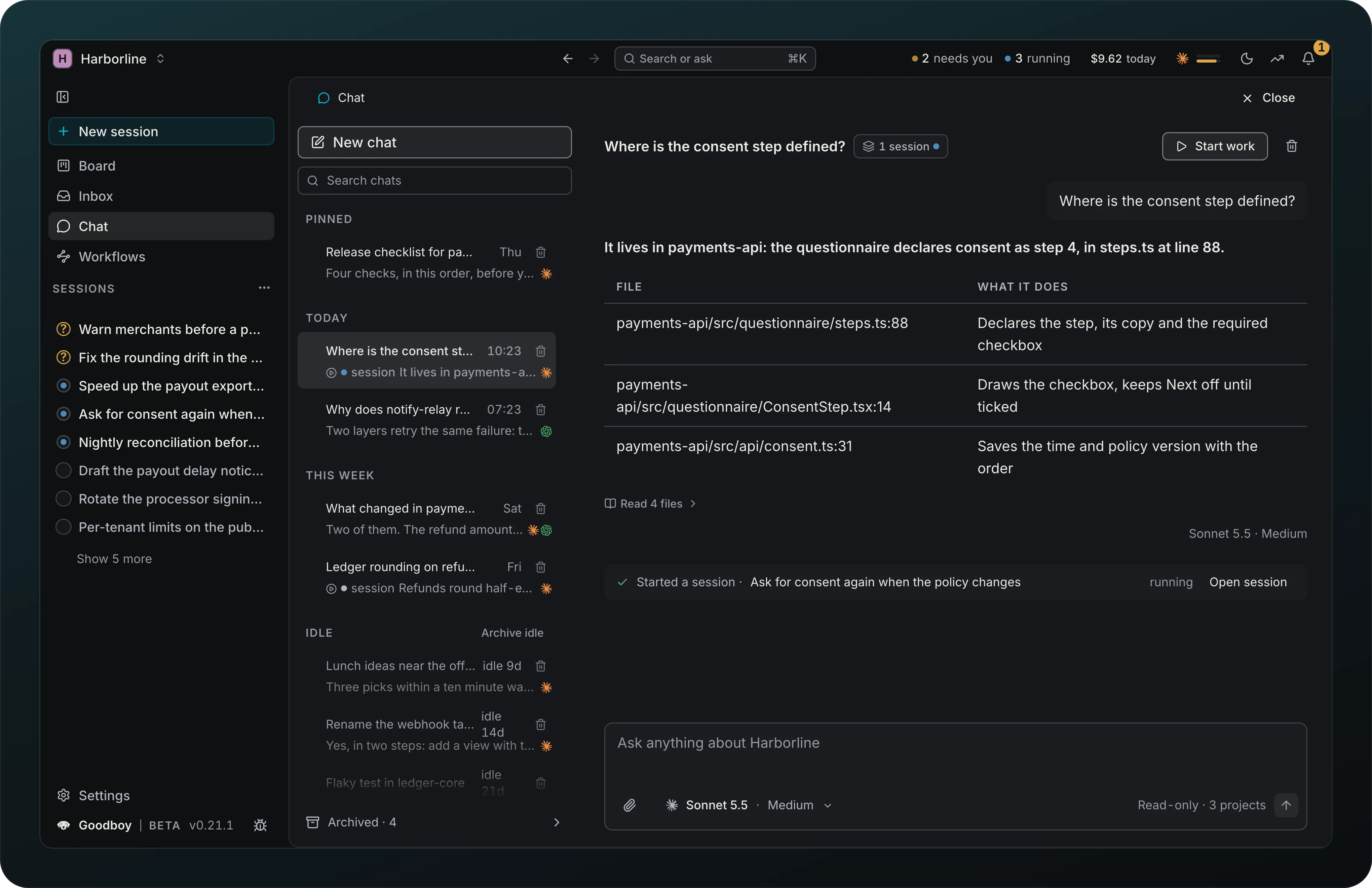
Ask about the workspace without starting a session. Chat, in the left column under Board, opens your chats on the left and one conversation on the right. Each chat reads every project of the workspace and never changes a file: the composer says Read-only · 3 projects, the answer streams in, Read 4 files lists what it opened, and the model picker beside the box is the same one you use for sessions, limited to Claude and Codex, the two providers that can be held to reading. It keeps the effort you pick for that chat and applies it from the next message. Make default in the picker, or Chat under Defaults in the provider settings, sets the model and effort every new chat in the workspace starts with, and Back to automatic clears it. Each answer names the model and effort that wrote it, so a chat that changed model shows both. Hover an answer for Copy and Start work from chat. Chats you have not used for seven days move to Idle, dimmed, and Archive idle clears them with an Undo. Nothing is archived for you. Every row names its model: a provider glyph, or two when the chat used both Claude and Codex, and with the list dragged to about 320 px or wider the model and effort too, as Sonnet 5.5 · Medium; hover it for the other models the chat used and its message count. Delete sits on every row and in the chat header without a hover, quiet at rest; one click asks in place, with Archive instead. A checkbox on a row, or X, starts a selection and a bar raises Archive and Delete, which asks once for all of them.
Hover a chat in the list for Pin and ⋯. The same menu opens with a right click or Shift+F10: Rename edits the title in place (Enter saves, Esc cancels), Mark as unread, Pin, Archive and Delete. Delete asks first in the menu, removes the chat's messages from this device and leaves any session started from it alone; the confirm also offers Archive instead. A chat that started a session shows a session mark with the session's stage on its second line, and a chat that used more than one model shows the providers it used.
Archived chats stay one click away. When any exist, Archived with a count sits at the bottom of the list and switches it to the archived chats, where Restore and Delete appear on hover and Delete all archived asks once. An archived chat opens with an Archived banner above the message box, and sending a message restores it. A session started from a chat shows From chat in its overview, and one fed by a chat shows Fed by chat, one line per chat, each opening it. The session row and the Board card carry a small chat glyph that names the chat on hover, and the session mark in the chat list opens the session.
Start work from chat turns a chat into work in a panel beside it: a model and effort you choose under Drafted by, the chat's own by default and remembered per workspace, drafts a title, a goal, what the chat established and the files it named, and you edit any of it. Start session creates a session with that goal and opens it, with nothing running yet; Runs on sets the model and effort the new session starts from. Add to a session opens a session you pick with the brief waiting in its message box, unsent; the chat says Draft added and links to the session only once you send it there. If the link cannot be saved, the panel says so and offers Retry. The Project field searches your projects and takes none, one or several; the session list groups by Active and Recent, with their projects, stage and age. Back returns to the chat.
A chat remembers the work it started. Once a session came from it, the header shows 1 session with a dot in the color of that session's stage; with several, the dot follows the most urgent one. The chip opens the list with each session's stage, whether it was started or added from this chat, and Open. The note under the answer that started it stays when you close the chat or restart Goodboy, and a deleted session drops out of both.
The left column shows when a chat is working: a pulsing dot on Chat, and a still New reply dot in the notification color on it, and on the chat in the list, until you open the chat.
Ask in a session
Ask what is happening in a session without leaving it. Ask at the right end of the trail band, or ⌘L, opens a panel beside the page. Right now comes first and needs no model: the fix run on the pull request with its counts (Fixing 9 comments on #318 · 5 to review · 1 question · 1 couldn't fix · 2 working), each agent that is running and for how long, the open questions and who asked them, and what the session has cost. Three suggested questions follow, picked from that state, such as What needs me? or Why did Tester fail?.
An answer reads the session as the app shows it: its agents and what they reported, questions, runs, review comments, branch and pull request, artifacts and recent events, plus the session worktrees. Its first sentence is bold, and the objects it names are chips: an agent, a run, a question, the pull request or a file and line. A chip changes the page beside the panel and Ask stays open; a resolver chip moves the page to Branch Comments at its thread, with its transcript one click away on the comment, and a plan opens inside the panel under Back to answer. Buttons appear only when the action is open to you right now: Answer question 1 opens the answer field with the words filled in, Review 5 to review opens the comments, and Tell Implementer… puts a message in that agent's box. You send it; Ask never acts for you. The footer names the model and effort, how long it took, what it cost and how many files it read.
Ask is read only, like Chat: Claude or Codex, defaulting to Sonnet at low effort, with the model picker in its box. Follow-up questions stay in the same thread, one per session, saved across restarts; New starts a fresh one, stays off while an answer is still coming, and the old ones wait under Earlier with their question count, the one you used last first. Its cost counts in the session cost, today's spend and the budget alerts, and shows as its own Ask row in the session spend. It works on a session with no project too, from what the session knows. The panel stays open while you move between the pages of the session and closes when you leave it; Back brings it back. Inside a session, typing a question in ⌘K offers Ask about this session first and Ask in Chat second.
Images in chat
Paste, drop or attach images in the chat message box, up to 10 per message, in PNG, JPEG, GIF or WebP. The chat keeps them as tiles under your message, and the model reads them with your question, on Claude and on Codex. If a message fails to send, its text and images go back to the box.
Roles
Give each agent the job it is good at. Nine roles come with the app, Scout, Debug, Plan, Implement, Review, Test, Resolve, Docs and Generalist, and a role sets the agent's instructions, its default model and what it hands back.
Agent header
Read who an agent is without giving the transcript away. The title, the Brief and Transcript tabs and the actions share one row, and role, status, time and model sit on one line under it. The agent opens on the Brief from every door, and on the Transcript only when you opened it at a line in the chat or picked the Transcript yourself on that agent before; that choice is remembered for that agent only. The time of a run past its usual stays a number in a warm tone, with the reason on hover. The Brief shows Now only when there is something to name (a tool, writing, thinking, or the subagents it waits on), and drops the turn count when the agent has none of its own. The title stays on one line and shows in full on hover. Every agent page has this header, even while it loads or when the agent is gone. The model is the one of the agent's last turn, then the one saved for it, and reads Model unknown when nothing is known; an agent that is running and has not started its turn yet reads Next turn: with the model it will use. The message box names its own model only when it differs, as Next turn, and shows a quiet Model otherwise. While a turn runs the message box offers a Stop button with its word. The header keeps one button with its word, the next state action such as Interrupt, Close or Reopen, and the menu beside it holds Delete agent, which asks in a card under the title row. The transcript starts right under the header, and a day divider sits at the left like the messages.
What the agent received
Screenshot from Goodboy 0.13.1
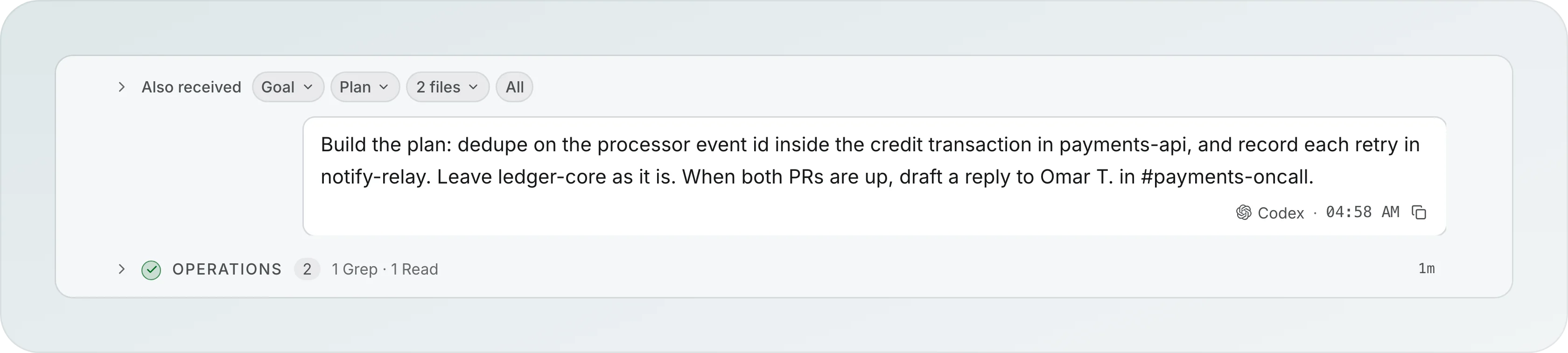
Check exactly what an agent was told. The top of each chat starts closed and shows the message and who sent it, here Codex. Open it to see a chip for each part of its brief: Goal, Plan, 2 files. All lists closed summaries, and View as sent to the provider shows the exact text, with a copy button. Long text stays at eight lines until you choose Show all.
Agent transcript
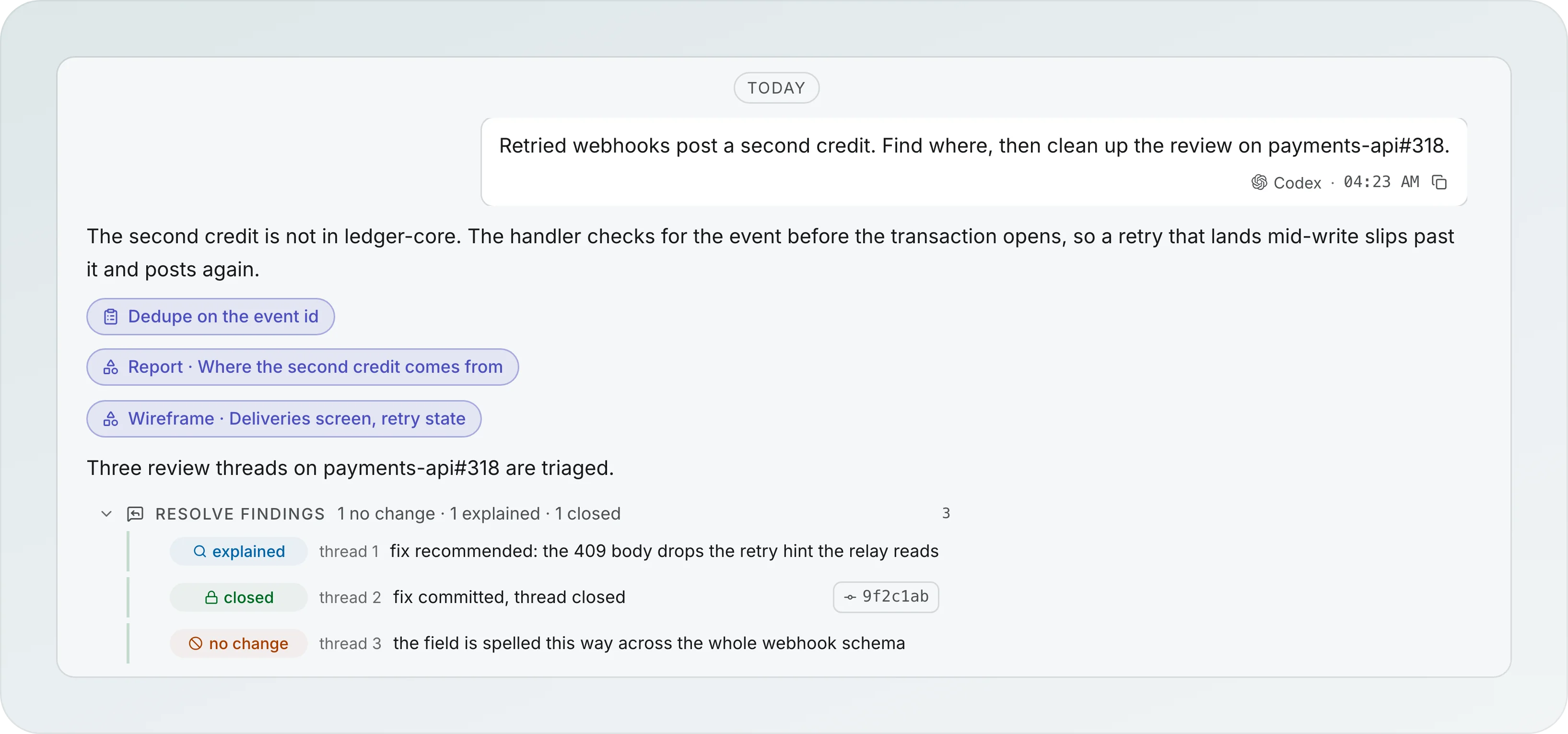
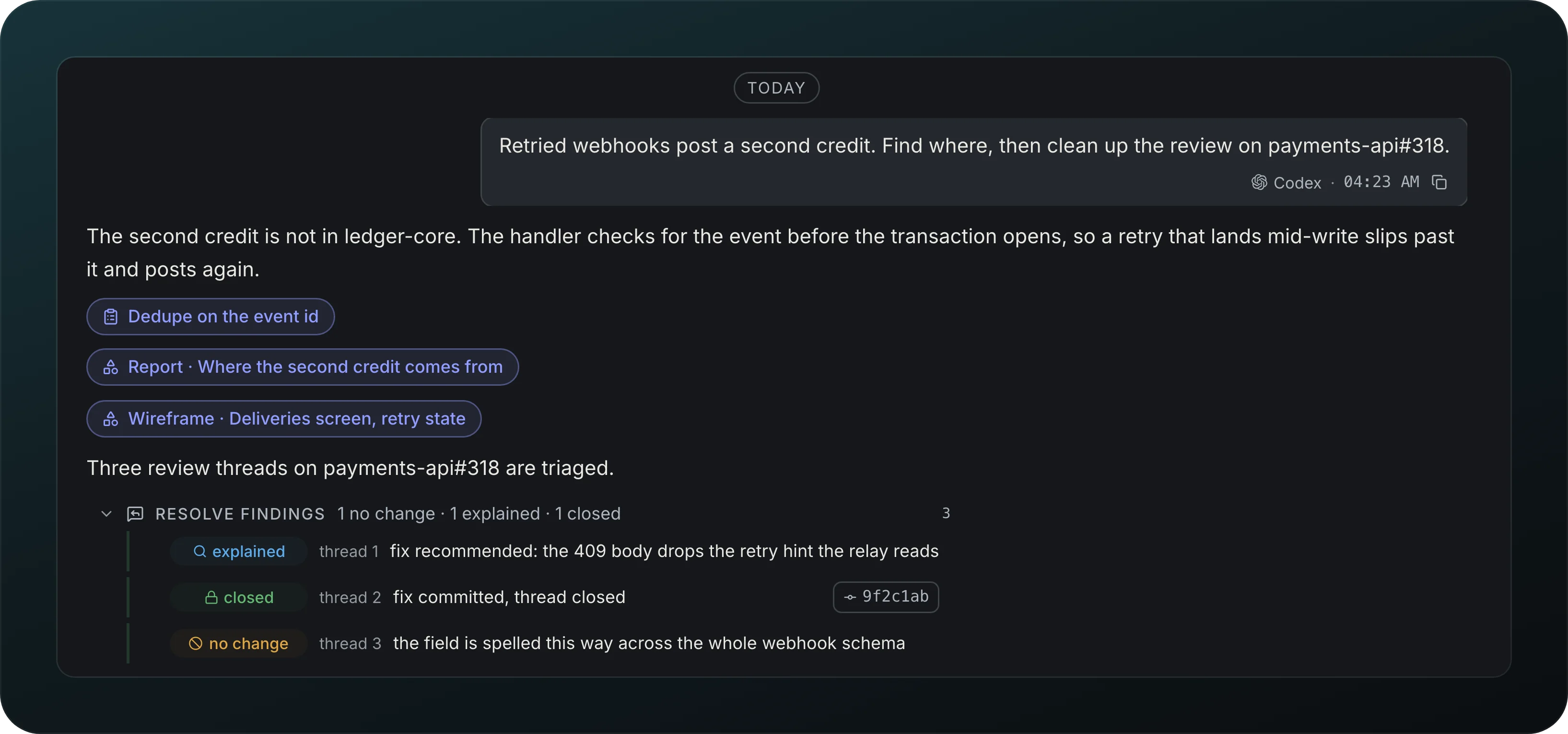
Screenshot from Goodboy 0.13.1
Follow one agent's work in order. The plan, report and wireframe it writes show as chips under its text, and a Resolve findings group lists each review thread as explained, closed or no change. File edits group into Operations rows, and questions and permission cards appear in the flow where you answer them.
Agent suggests
When an agent recommends another role, its transcript shows Agent suggests with the reason. Pick the provider, model and effort on the card, then press Start. The new agent starts with that reason and what the previous agent wrote.
Queue or send now
Keep talking while an agent works. Enter queues your message for its next turn, ⌘Enter interrupts and sends it now, and the queue survives a restart.
Message and document fields
Write to an agent the same way everywhere. Chat, kickoff, answers, review replies, diff comments, the goal, guidance and workflow steps share one field with Write and Preview, markdown, and files by paste, drop or Attach where the field takes them. A message sends on Enter and adds a line on ⇧Enter; a document adds a line on Enter and saves on ⌘Enter. Start agent and the issue kickoff start on Enter, and review replies send on ⌘Enter. Keys from before 0.15.5, in Settings, Shortcuts, brings back the old keys.
Stop and Continue
Stop an agent without losing its work. Stopping keeps what it wrote and offers Continue. An agent that was working when you reload, restart or update Goodboy keeps going: a reload finds it still running, and after a restart it picks up where it stopped, with a note in its chat. One that cannot pick up says Stopped by restart and offers Resume. When a restart stops several, Resume all in overview Next steps, or above a workflow's steps, brings them all back.
Turn footer
See what each turn cost: provider, model, duration, tokens, cache share, estimated cost and a context meter.
Tool call states
Tell at a glance what a tool call did: Running, Done, Failed, Needs permission, Stopped or Denied, with elapsed time and readable input and output.
Composer plus menu
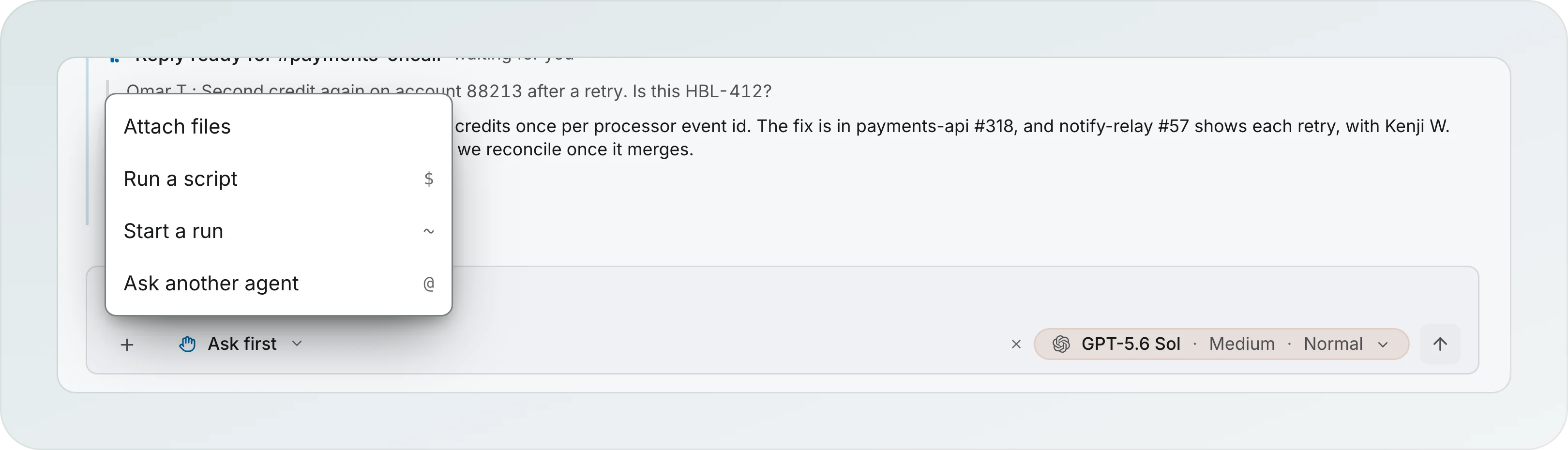
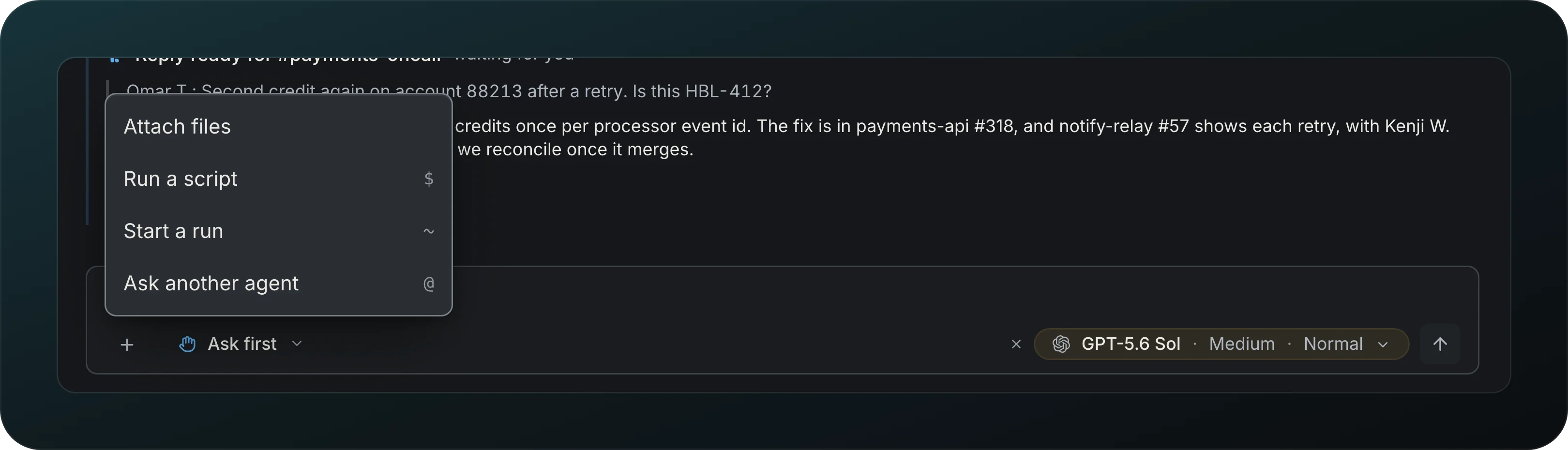
Screenshot from Goodboy 0.21.1
Do more from the message box. The + opens Attach files, Run a script ($), Start a run (~) and Ask another agent (@). $ lists your saved scripts and the package.json scripts you pinned, across pnpm and yarn workspaces. In the command palette, $ lists the scripts you pinned and your saved scripts, each with its project.
Attach files
Hand an agent images, PDFs, CSV and text files, up to 10 at a time and 10 MB each, by paste, drop or pick.
Drift warning
Hear about it when an agent steps outside its role, like a planner editing files. Goodboy checks each turn against the role and sends a notification.
Subagents from plan parts
Run a plan part by part. An implementer given a plan splits into one sub-agent per part, shown as 3.1 and 3.2, and a plan can give each part done-when checks and the files it expects to touch.
History rewriter and Scribe
Let two helpers work on your history and your pull request text without the power to push. Their git points at a push address that goes nowhere, and their GitHub tokens are removed. When the Scribe writes a pull request, its page shows the text as Pull request text, in the transcript and in the Brief, with Creating, Created #N or Failed. A failure reads "Couldn't write the pull request text" with the raw message behind Details and a Retry, and the agent's header says Failed too instead of Done. A later question to the Scribe does not erase it.
One language per session
Get agents and summaries in the language of your goal.
Archiving a chat offers the shared Undo toast and Cmd+Z outside text fields. Both undo the latest app operation.
An unread chat list shows loading rows. Its first empty state offers Start a chat; a search with no matches offers Clear filter. Failed reads offer Retry and Details.