Storage
Free disk space and clean up branches, with what is safe to remove spelled out. Goodboy tells you why each folder or branch exists and what removing it costs, so you can clear space without guessing. Transcripts and app data at the foot of the page covers the rest, with one Saved versions row for the files agents changed in your folders. Those versions go by themselves 30 days after each session ends.
Worktrees of a project
Manage the worktrees of a project from its block on the session overview. 3 worktrees · 1.1 GB on the block opens a sheet with one row per worktree, from every session. Each row shows the branch, the session, the size, the last change and the state: Clean, 2 ahead or Unsaved changes. The row opens its session, and Open in Terminal and Remove sit at its end. Remove asks in the row first, and the branch stays.
Remove 2 safe · 1.2 GB at the foot lists only the folders Goodboy can remove safely, names each one with its size before it removes them, and offers Undo. New branch adds a worktree to the session you pick. Clean up in Storage opens this page. The sizes are measured each time the sheet opens, and a second window reads the sheet again after a change. ⌘K finds the sheet as Worktrees in ledger-core.
Worktree folders
Free disk space from the checkout folders of archived, deleted or gone sessions. Worktrees lists each with its size and a check glyph when it is safe to remove (the reason is in its tooltip); Remove for one folder sits in its ⋯, and Remove 3 safe folders in Harborline clears them together. Folders with changes, running agents or a process inside are skipped, with the reason. The verdict comes from Rust, the same checks the removal runs, so the page only reads it. Goodboy proposes and never removes by itself: nothing goes until you click, and a notice after a removal names what it freed. Suggest cleanup after, the last row of Worktrees, sets how long a clean folder sits idle before it counts as safe to remove. A clean folder with a terminal open in it, or in one of its subfolders, reads A terminal is open here, leaves the safe list and the bulk button, and offers Close terminals, which names each terminal and asks first (the same test the removal uses; an exited shell no longer holds a folder). Undo on the notice puts every folder it removed back on its branch, with the commits the branch kept, and puts the folder back in its session when it had one; it never overwrites a folder that is already there, says which folder could not come back and why, and offers Retry for those. Ignored files such as node_modules are not restored.
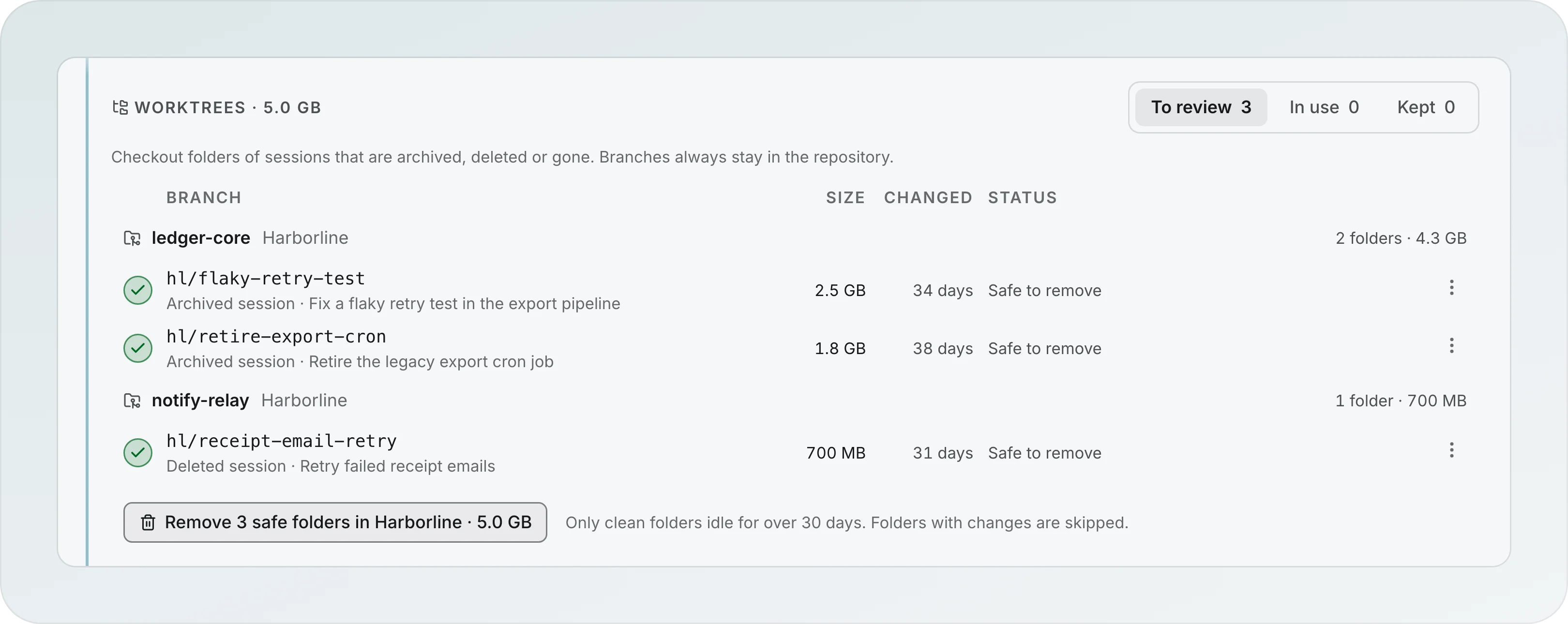
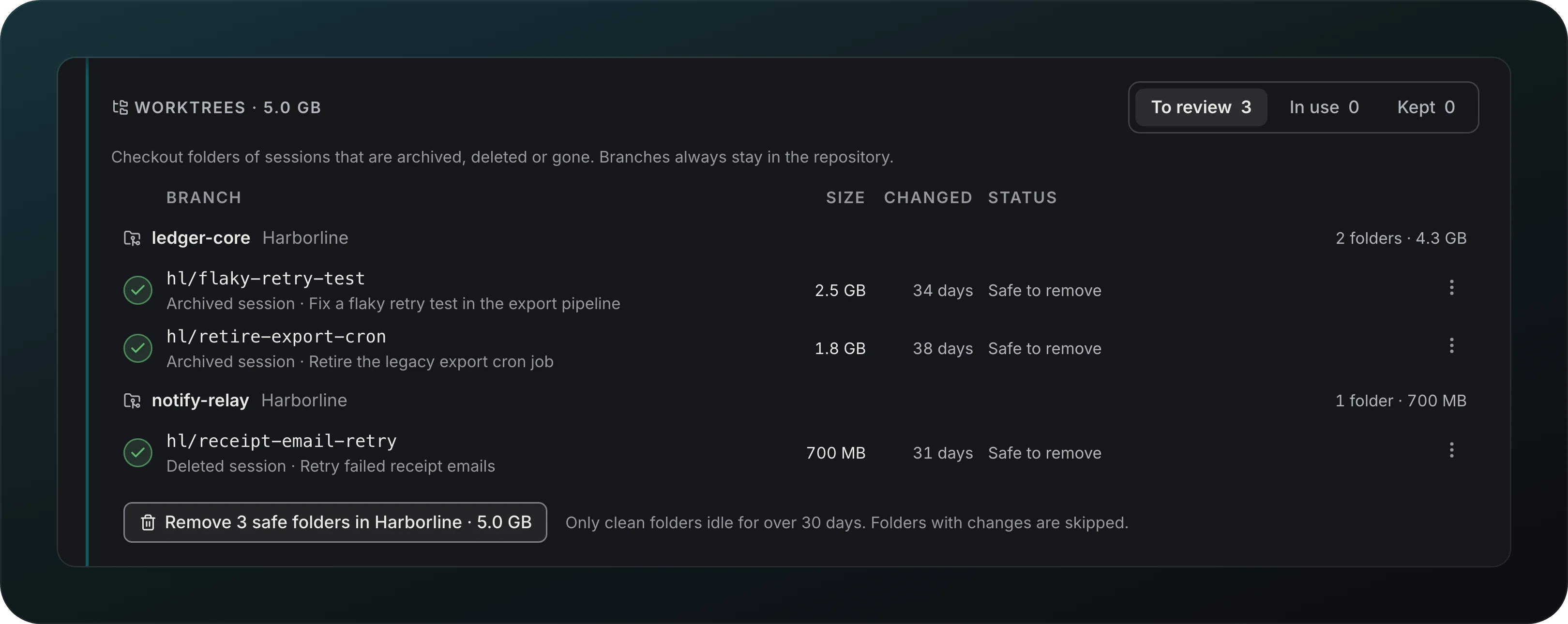
Screenshot from Goodboy 0.40.1
Branches
Delete old branches with confidence. Branches, under Worktrees in Storage, lists the branches that are Safe to delete in the picked scope and shows how each was merged. Rust decides which branches are safe; the page only maps it to a label. Check again in the page header reads the branches again with the sizes. Deleted branches wait in Recently deleted with Restore, and a merged branch can be removed with Undo. The Branches page in the settings of a workspace keeps the branch name and the After merge rule.
Storage scope
Clean up this workspace, other workspaces, removed ones or all of them, from the picker in the page header. Bulk actions name the scope they act on.
Artifacts from deleted sessions
Decide what to keep from sessions you deleted: their plans, reports and wireframes, with Keep or Delete.
Goodboy can free N GB
Hear about reclaimable space once, when idle safe folders pass 10 GB or the disk runs low. After a notice it waits 14 days and another 10 GB before speaking again.
Other tools
See how much space the other coding tools keep, without risking their history. Other tools at the foot of Storage lists Claude Code, Codex and Cursor with their size and how much comes from Goodboy sessions. The sizes are each tool's saved sessions (transcripts), not worktrees. The Claude Code share includes the sessions Goodboy runs in its scratch folders and the history copies it makes. It is read only, and Goodboy measures sizes and names, never the files inside.
Under the hood
This part is for contributors and agents who change the feature.
- Folder verdict:
folder_verdictinapps/desktop/src-tauri/src/worktree/remove.rs, sent asverdictbyworktree_folder_facts.loadStorageasks it for every mount, the ones in use too. - Worktrees sheet:
features/storage/components/ProjectWorktrees/, its rows and every count fromtracksOfWorkspaceinfeatures/track/. A folder in use goes throughremoveMountWorktreewith the path, branch and revision Storage read, and is kept when the mount no longer matches them; its undo reloads the session withloadSessionMounts. - Sizes on open:
loadStorage({ shouldMeasureAll: false }), thenmeasureStorageSizes({ paths })measures only the sheet's folders. - Every window:
worktreesChannelemitsgoodboy:worktrees-changedfromforkMount,removeMountWorktreeand a Storage removal or undo; a closed project block reads its count again without measuring. - Open terminals:
terminalsInFolderis the test the removal uses. - Undo of a removal:
worktree_folder_restore. - Branch verdict:
is_safe_to_deleteon each scanned branch.