Review and resolve on the Branch page
One Branch page per branch holds the Pull request, Comments, Files, Commits and Checks tabs. Edit the pull request in place, merge it your way, turn review comments into commits with a Fix run, push them back with one Push, and read your own diff and notes before anyone else does. On GitLab the same page reads Merge request, MR !42 and Open on GitLab: you edit it, ask reviewers, mark it ready, merge it the ways the project allows and read the jobs of its pipeline. On Bitbucket it works the same on a pull request.
Resolve
Screenshot from Goodboy 0.23.0
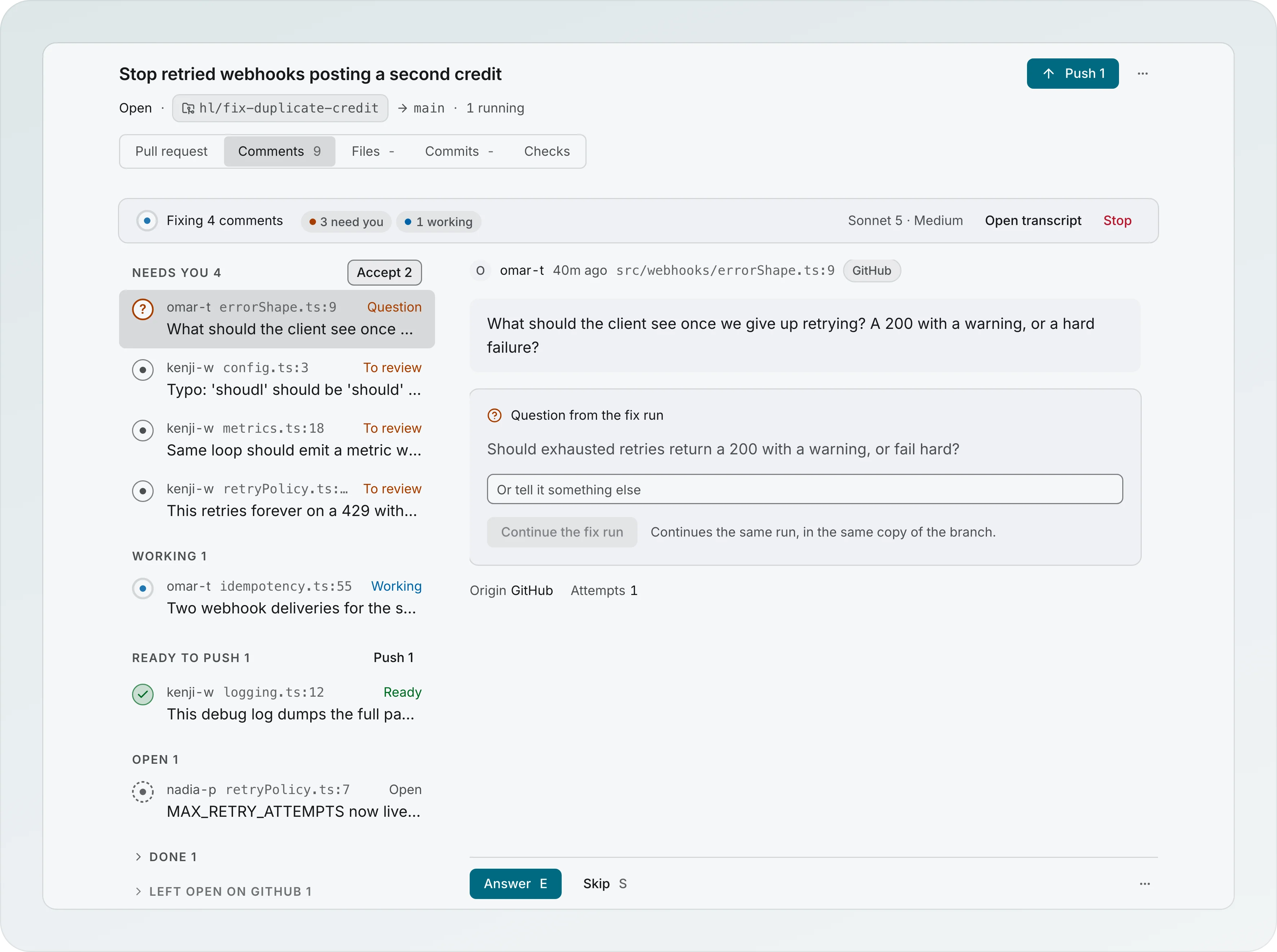
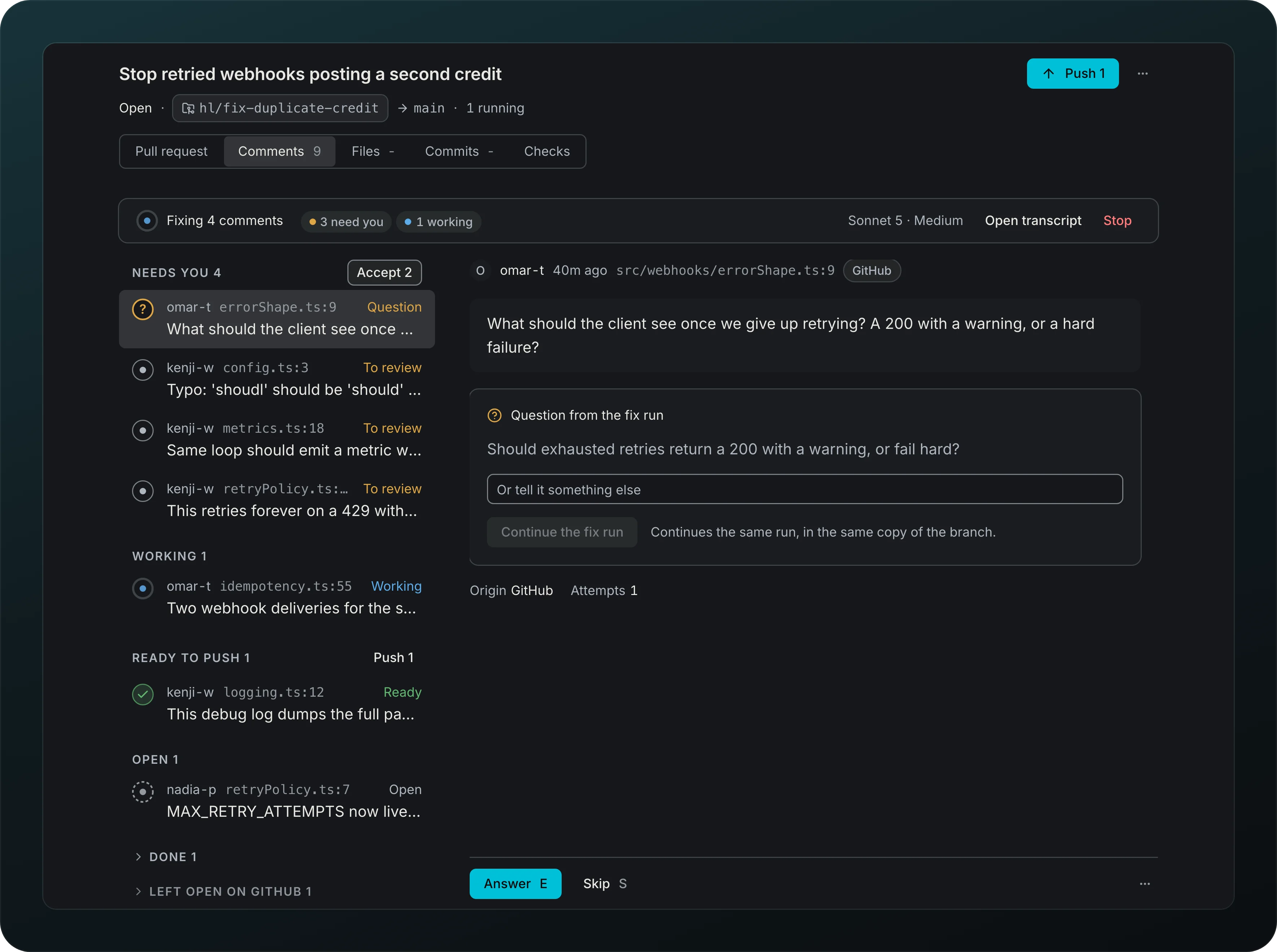
Turn review comments into commits without writing the fix yourself. The Comments tab lists the comments on the left and the one you picked on the right. Press Fix on a comment (or F), or check the comments you want (the box that shows on hover, X or Cmd+A) and press Fix N in the bar at the bottom of the list. A panel opens in the right column in place of the thread, so the page does not move: the comments it covers, with a check to drop any, the model it runs on with Change, and an optional note for the run. Start fixing N begins, Esc closes it, and the list keeps the comment you had open. Fix on a single comment opens the same panel for that one. One agent works through the comments in order, in its own copy of the branch, and a branch never has two agents fixing at once: comments you send while it works, a retry, Fix anyway or a message to another agent of the same branch wait in a lane and say Queued, after the current fix. Branches still run beside each other. Each fix is a commit stacked on the one before, so a later fix sees the earlier ones, and the agent drafts the reply. You accept, edit, reply yourself or skip each comment on its own. Accepting puts the fix on your branch together with the fixes before it, in order: the button on a fix with earlier ones reads Accept 3 fixes. Refusing or taking back a fix in the middle drops it and the lane rebuilds the ones after it on top, with one line saying so. While a run is going, one line under the tabs says what it is doing: Fixing 2 of 5 · next: Module name… (or Waiting for your answer), the tally of the run (4 need you · 2 working · 2 ready to push, each a filter for the list, with 1 push failed or 1 couldn't fix next to it when one happened), the model it runs on (Sonnet 5.5 · Medium), Open transcript and Stop. The list is grouped by delivery: Needs you, Working, Ready to push, Open, Done and Left open on GitHub, the last two closed. Every count of comments in the app reads one value: the group titles, the line under the tabs, the Accept and Push buttons, the push banner, the Branch page in the sidebar (3 need you) and the Overview. The actions of the comment sit in a bar at the bottom of the thread that stays in view while the thread scrolls: Accept, Reply only and Skip on a fix to review, Answer and Skip on a question, Retry push and Skip on a push that failed, Undo on a comment ready to push, Undo skip on one left open, Open transcript and Stop (it asks first) on one being worked on and View on GitHub on a done one. The ⋯ holds the rest: the agent transcript, Resolve without a reply, Open on GitHub and Copy link. Every fix run you start raises one Fix run started toast (Fix queued after the current fix when another fix holds the lane) that names the comments and the repository, with Follow, which opens the transcript of the run beside the Comments tab. The agent asks only when a comment reads two ways that lead to different code: the question shows in that comment's thread as Question from the fix run, with its options (the one it recommends is marked), a field for Or tell it something else and one Continue the fix run. The same question shows at the top of the fix run transcript, which opens in a drawer on the right of the Comments tab, so the list and the thread stay where they are. Answering a question, retrying a comment that could not be fixed and writing to the agent all go to that same agent, in the same copy. A retry keeps the model, commit style and hint the comment started with; pick another model and the comment starts over as a new fix run.
Bulk actions
Fix, answer and accept many comments at once. With no fix run going, the line under the tabs reads 9 open comments with Fix 9: it checks every comment you can fix, the open ones and the ones that could not be fixed, and opens the launch panel. Cmd+A checks the same set. A comment that needs you stays out, because you answer it instead. Draft fixes for 9 on the Overview and Resolve 9 comments on a Board card open that same panel on the Comments tab with the same comments checked, and never start a run by themselves.
While a run is going and two or more questions are open, Use the recommended answers (2) shows in the line under the tabs, next to the model. A panel opens in the right column with each question and its recommended answer already chosen. Pick another answer, or Drop a question to leave it in Needs you, then Continue with 2 answers sends them all to the same run. Retry 1 that couldn't fix retries every comment that could not be fixed, in the same run and the same copy of the branch.
The Needs you group has Accept 3 next to its name, and it counts only the fixes waiting for your Accept. With such comments checked the bar at the bottom says Accept 3. A bar 5 accepted with Undo appears right after, and Cmd+Z does the same: the comments go back to Needs you. They move to Ready to push, which has a quiet Push 5 link that does what Push 5 in the header does. Nothing leaves your machine until Push, and the header stays the one place that pushes.
Review sources
Read the comments of a pull request, apart from your own notes, in the Comments tab of the Branch page. Each comment carries a label, GitHub, GitLab or Bitbucket; there is no source picker. Your notes never show here, they have their own drawer on the Files tab (see Notes before a pull request), so resolving a note never touches a provider thread. With no pull request the tab reads No pull request yet with Create pull request. Draft, reply and push work the same everywhere. Where a provider cannot resolve a thread, the comment offers Reply and no resolve, and the push confirm says the thread stays open for the reviewer.
| Source | Read comments | Reply | Resolve thread |
|---|---|---|---|
| GitHub pull request | Yes | Yes | Yes |
| GitLab merge request | Yes | Yes | Yes |
| Bitbucket pull request | Inline comments | Yes | No, the thread stays open |
Comment states
Screenshot from Goodboy 0.23.0
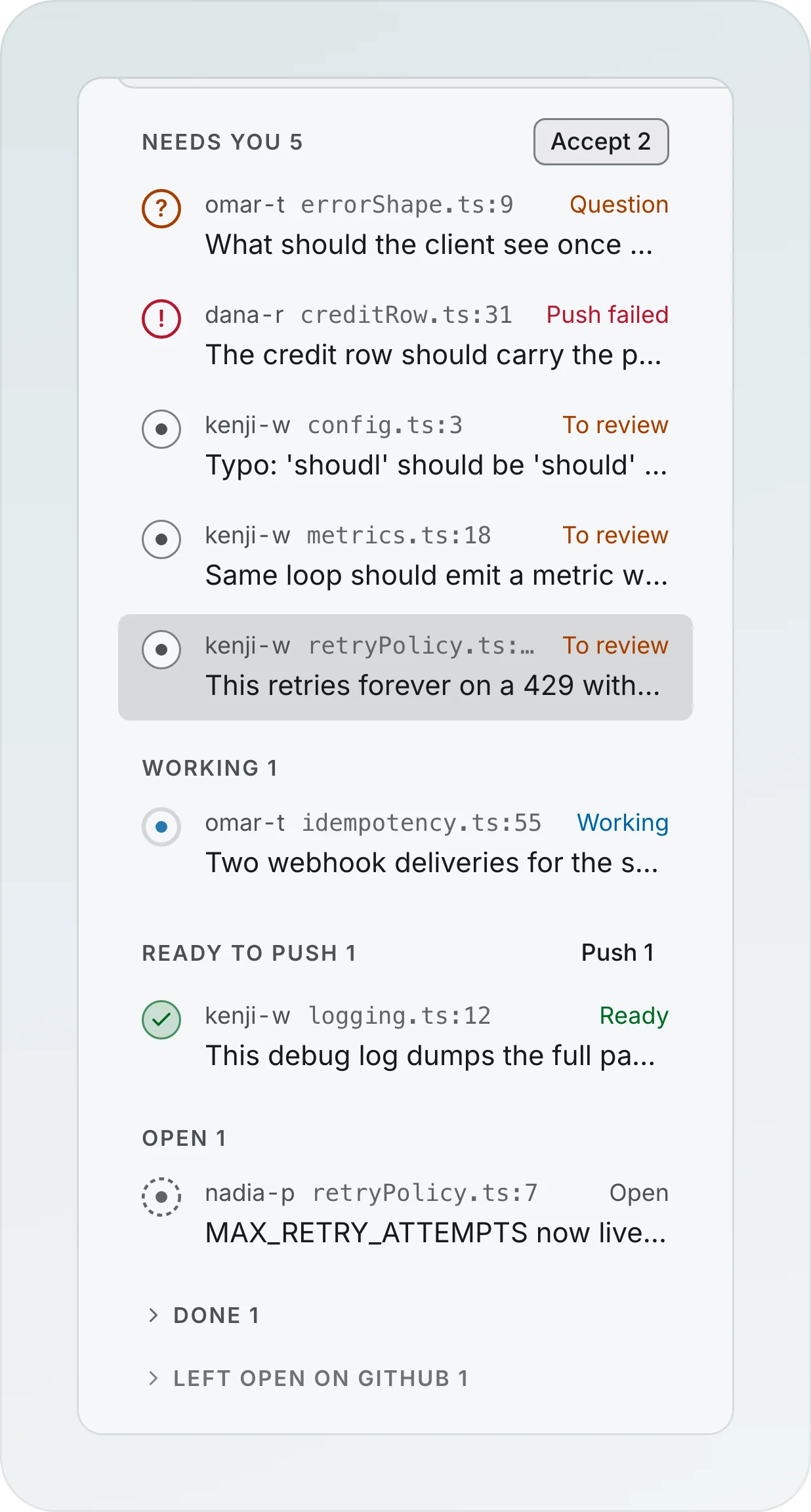
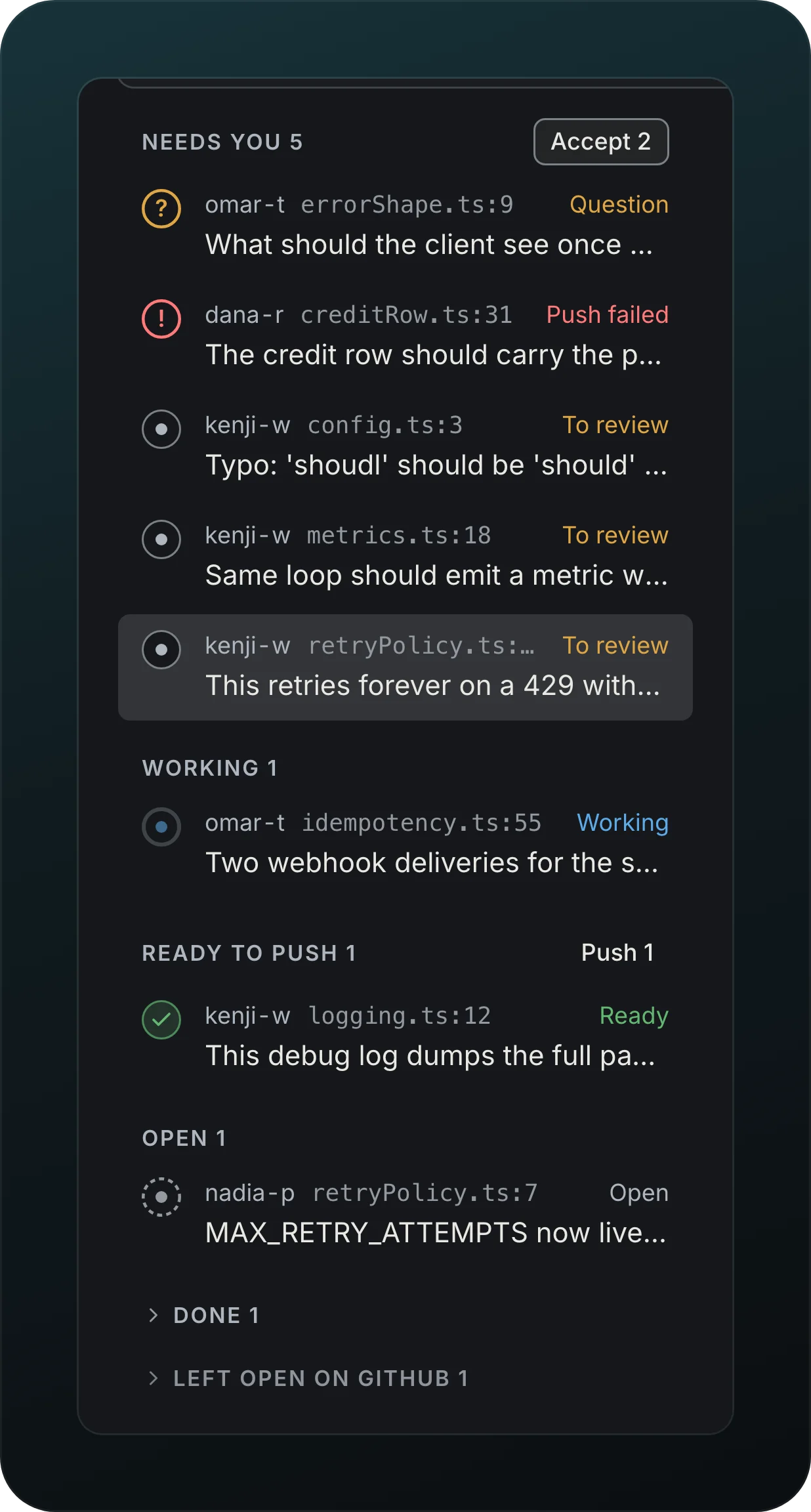
Know what each comment needs next, and what has been sent. A comment reads Question when the agent asked, To review when a fix or a reply waits for your Accept, Push failed (the only red here) when the push of an accepted comment did not go through, Couldn't fix (amber) when the fix run could not fix it, Working while an agent is on it, Ready once you decided and nothing has been sent, Done once it was sent (and closed on the host where the host can close it) and Left open when you skipped it. A comment not yet in a fix run reads Open. Question, Push failed, To review and Couldn't fix sit together under Needs you, in that order; Ready sits under Ready to push; a skipped comment sits under Left open on GitHub (the name of its host) and its thread stays open there. On Bitbucket, where a thread cannot be resolved, a sent comment reads Done with the sentence Sent to Bitbucket. A working comment shows how long it has been going and its last step; one to review shows the change, the reply and Accept, Reply only and Skip. A word's detail (Fix ready, waiting for your review) shows on hover. What git says, Checks failed and Comment changed are small notes next to the word. A comment is marked changed only when the reviewer really edited the original comment after the draft (a new reply shows as New reply from the author and never blocks Accept): the card shows the text before and after and who wrote it, and you choose Redraft with the new comment or Keep the draft. A comment whose line moved on GitHub says so, and stays as it is.
Failed drafts
Know why a fix could not be made and what to do next. A run that ends without a result is never a failure: the agent's own last message shows as the question, under Needs you. When a fix really failed, the comment says why in one sentence from the cause Goodboy recorded: it did not start, the provider stopped it, every provider is over its spend cap, you stopped it, the app closed, it conflicts with a fix you accepted, the worktree is gone, or the fix could not be saved. Comments from before 0.20 say the cause was not recorded. It also shows the last command the agent ran and how it ended, and links to the transcript. Retry in this run continues the same run in the same copy of the branch for that one comment; Start over with a new agent begins a new run; the ⋯ menu holds Try another model (picks which model a new agent uses) and Add a hint (retries with a note). Earlier attempts fold into one line above. When a push fails because the branch on origin moved, the result under the header offers Sync and try again, which asks first, brings the new commits under yours, and stops without touching anything if they conflict.
See what a resolve did
Click a resolve in Activity, Open transcript on the run line or Agent transcript on a comment, and the fix run opens in a drawer on the right of the Comments tab (of the Files tab for a note), never on a page of its own, so the list and the thread stay where they are. The drawer shows what the resolver did, the commits it made and the comments it touched, each a link to that comment, then the whole conversation and a field to write to the agent. Accept, reply and push stay in the comment, where Push names the commits that would go with a fix. A resolve that fixed several comments together says so, and Open them in Comments shows just those. A question the run is waiting on shows at the top of the drawer, with the same options as in the thread. Activity has one row per run, Fix run · #318 · 9 comments, with the tally, the model, the time and the cost.
Fixes already on the branch
The Branch page looks at origin before it pushes. A comment whose fix you already pushed reads Already on origin, and one that someone else's commit seems to have fixed reads Looks fixed with the commit and its author. Both offer Reply and resolve and never push. If you already answered a thread yourself it reads You replied and offers Resolve only. On a Bitbucket pull request, where a thread cannot be resolved, the same moves read Reply and Post this reply, and there is no Resolve only.
A fix that went missing
When the commit of a fix is no longer on the branch or on origin, the comment reads Fix went missing with its own detail, and the push blocker points to it. Goodboy first asks git without an agent: the same patch under another sha turns it into Folded in: it stays in the push (the header Push) and its reply, "Fixed in the old sha, squashed into the new one", goes out after the push lands. If that is not enough, Re-check starts a read-only agent on the cheapest model of your provider. It answers Already fixed here (Reply and resolve with the sha), No longer relevant (Close with this reply, editable) or Still needed (Fix again, Add a hint). A verdict never closes or fixes anything by itself. A pushed fix that origin lost later, after a force push or a squash done elsewhere, gets the same check.
Close on GitHub
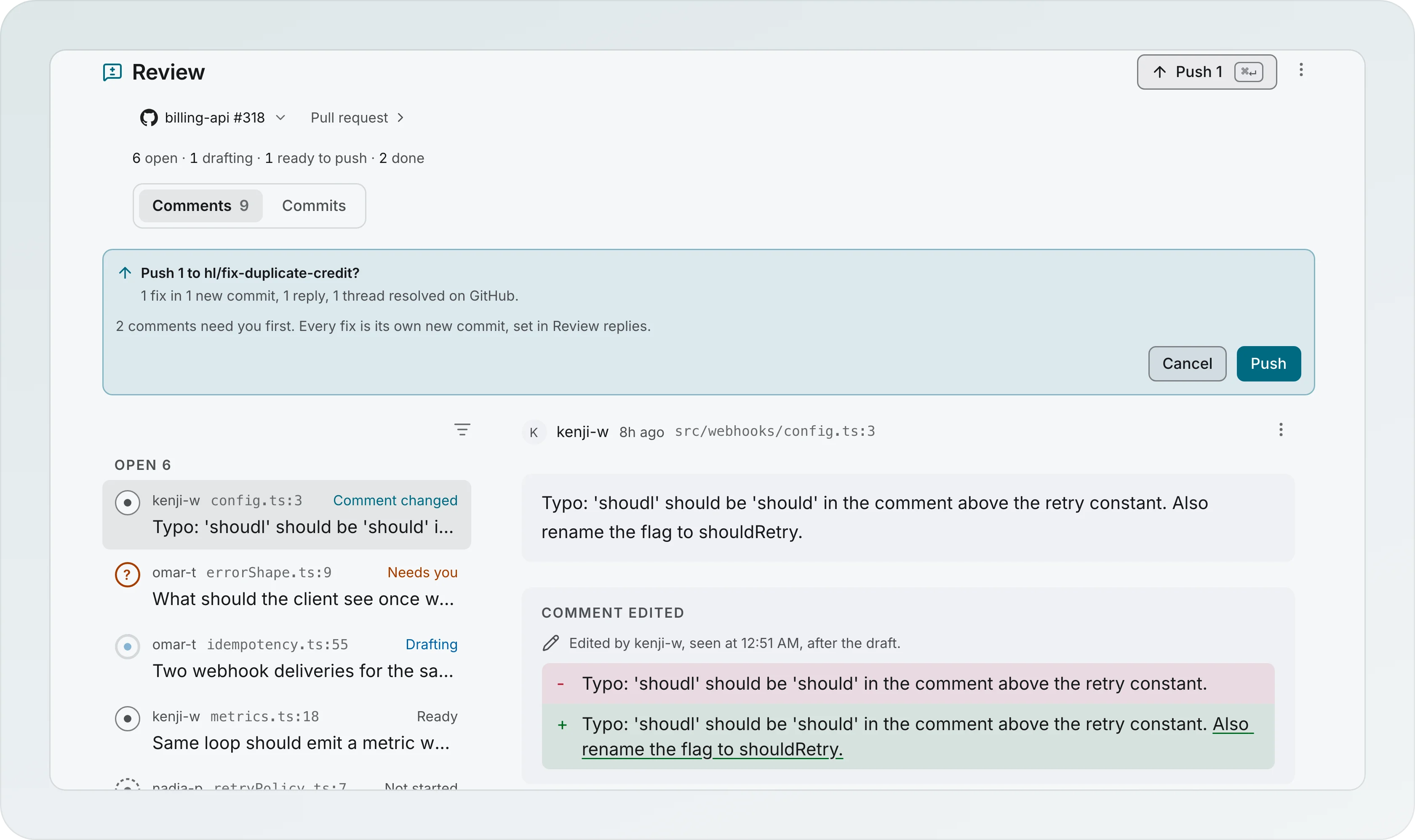
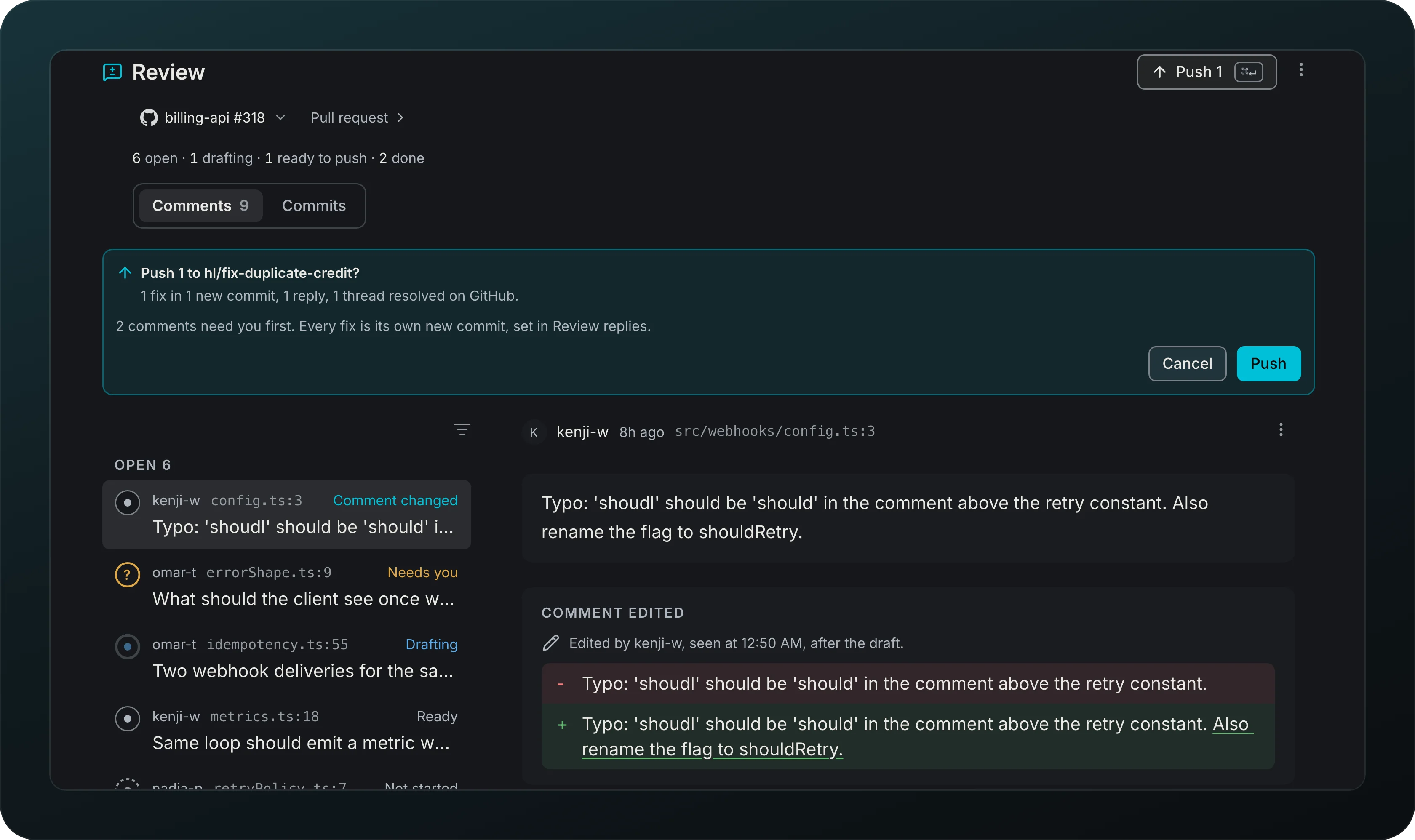
Screenshot from Goodboy 0.14.0
Finish a review in one action. There is one Push, in the Branch header, and no push on a single comment (a reply with no change is the exception, below): Push 1 opens a preview right under the header: Push 1 to hl/fix-duplicate-credit?, with the count of fixes, replies and threads it will resolve on GitHub, and a note when comments still need you. Push pushes the fixes, posts the replies and resolves the threads (on a GitLab merge request too, not on Bitbucket). Cancel leaves everything as it was. After an interruption Goodboy looks for your reply in the thread before posting it again.
A reply-only answer is never left waiting on a push that will not come. When you accept one and no accepted fix is waiting to push, it is posted on the spot as a reply in the thread: the note reads Posting the reply, then Replied on GitHub with View comment. If a fix is waiting, the note says Reply only. It goes out with the next push. with Post reply now beside it. A reply that could not be posted shows its reason in the comment with Retry. When the pull request refreshes and a reply you wrote yourself on GitHub says the same as the draft, the comment reads Replied on GitHub and Goodboy does not post it twice.
You steer the answer in the thread, no dialog. On an answer with no change, Fix it anyway starts a fix for that comment, with a field for an optional hint. On a fix that is ready and still staged, Reply only drops the change for that comment and keeps its reply to edit; once the fix is on the branch it is not offered. On a reply with no change, Rewrite reply opens a field for a hint and asks the agent for a new reply with no code change; on a fix, Edit reply lets you change the text by hand before it goes out. A Retry on a reply that failed alongside other conversations points to the pull request bar, and a reply that may already be on GitHub is checked there before it is sent again.
Review replies in your voice
Get replies that sound like you, Terse, Friendly, Formal or Your replies. Your replies reads your last 20 review replies and writes a style note you can edit. When you squash or fold a fix, the reply names both commits, and a reply already posted gets an Update line, which you can turn off in Settings.
Fixes on a branch that moved
Accept a fix even after the branch got new commits: it lands on top of the latest one, and on a conflict the branch goes back to its old head.
Squash and fold the resolve commits
Tidy the fixes before anyone sees them, on the Commits tab of the Branch page. It lists the commits since the base, yours and the resolve commits, and opens the history rewriter on them: fold a fix into the commit it belonged to, squash it with the one above, reword it or drop it. Backups restores the branch to how it was before a rewrite. A rewrite is tried in a copy first and a backup is kept. When commits are already on origin it says first that this is a force push with lease that reviewers will see as force-pushed. Undo rewrite restores the backup and puts every comment back on its commit.
Notes before a pull request
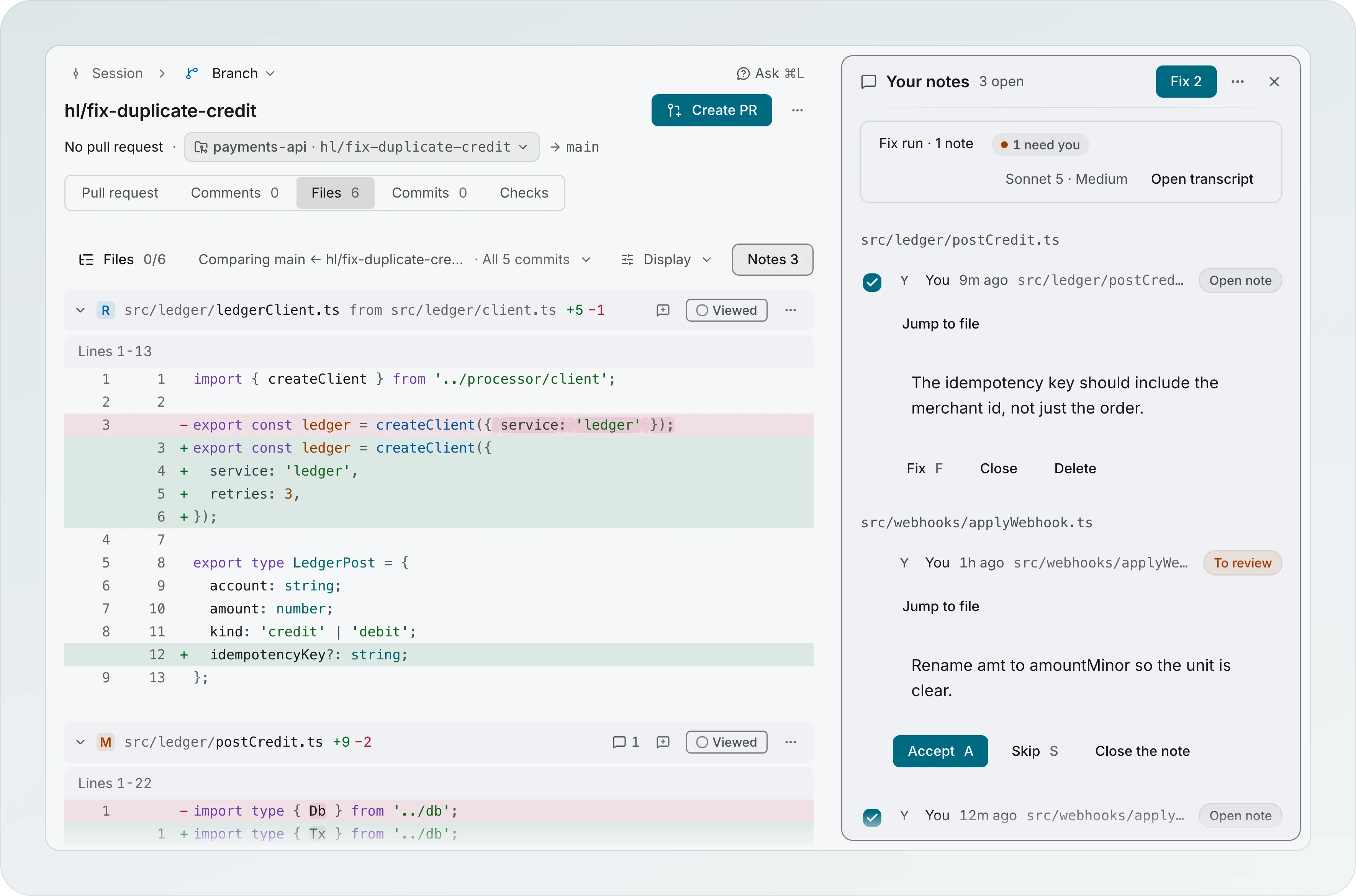
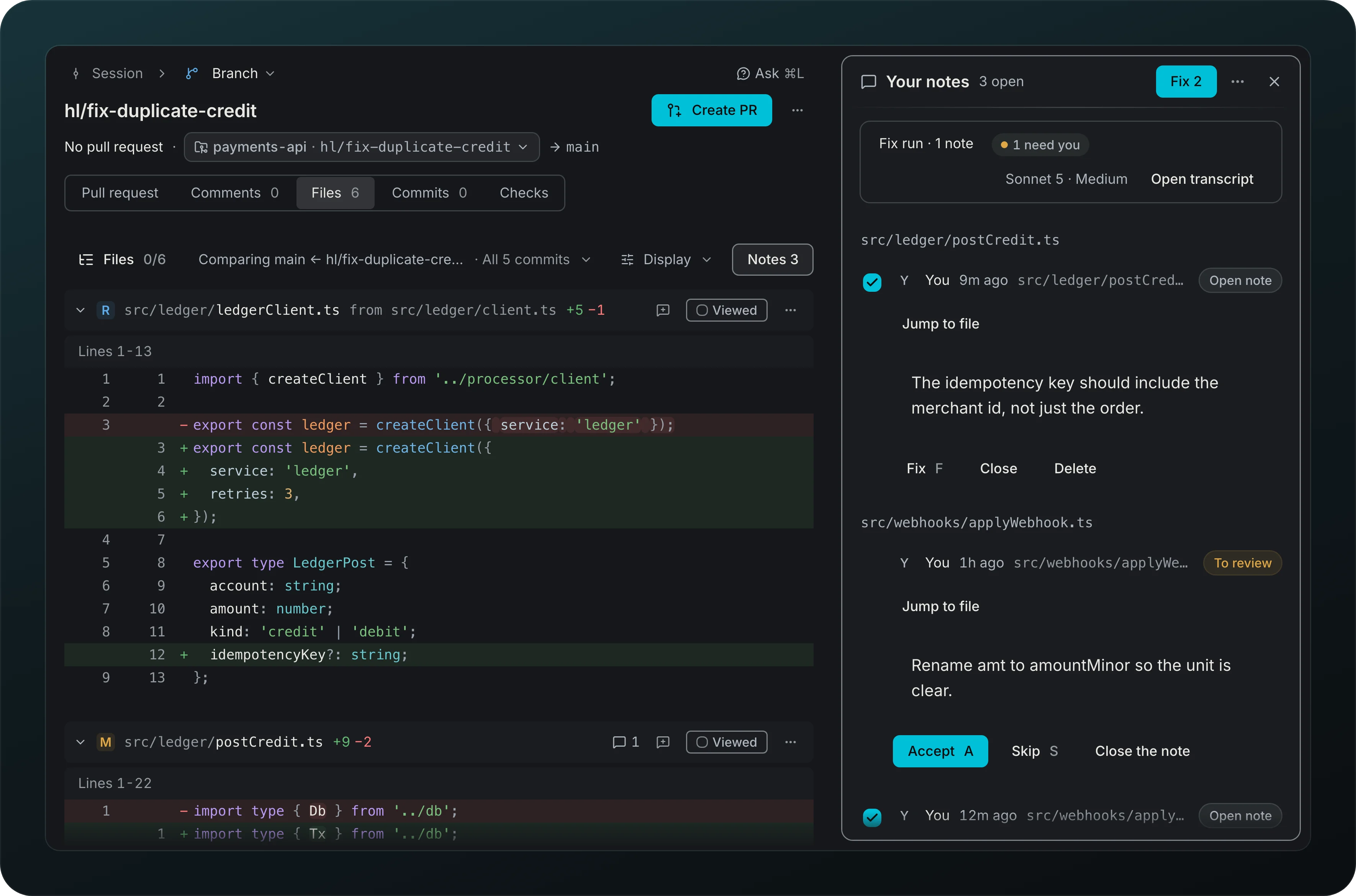
Review your own diff before anyone else does. The Files tab lists the changed files as a tree in a rail beside the page, folders first, with a ring on each folder that fills as you mark its files Viewed, and Comment on file for a note on a whole file. Leave notes on lines with Add note in the Files tab. A note belongs to a branch: it is stored with its project and branch and shows only there. Saving a note only updates the Notes 2 button in the Files toolbar and the note count on the file in the tree; nothing opens by itself.
Notes N opens your notes in a drawer on the right, apart from the pull request comments. It reads Your notes with the count (3 open), groups the notes by file, and draws each one like a review comment: Open note with Fix, Close and Delete (Undo brings a deleted note back), Working with the run line above the list (Stop and Open transcript), Ready with Accept (keeps the fix on the branch and closes the note), Skip and Close the note, Couldn't fix with Retry, and the question of a run, answered right there. Jump to file goes to the file in the diff. Fix 3 is the one primary: one fix run on the notes you left checked, in the lane of the branch, so a note fix and a pull request comment fix queue one after the other and Accept 3 fixes · 1 is a note names both. ⋯ holds Show closed and, with a pull request, Move 3 to review draft, which turns the open notes into draft review comments (a note on a whole file too) and closes them. A comment on a file from before 0.23 stays in your review draft, and a quiet line at the end says so, 2 older drafts are in your review draft, with Open review draft. Notes with no branch wait in Unassigned notes on the Session overview, in full, each with Move to a branch (you pick one when the session has several) and Discard. Discard removes the note at once, with no confirmation: the toast Note discarded offers Undo, and ⌘Z brings back the same note. With two or more, Discard all does the same for the whole list.
Pull request on the Branch page
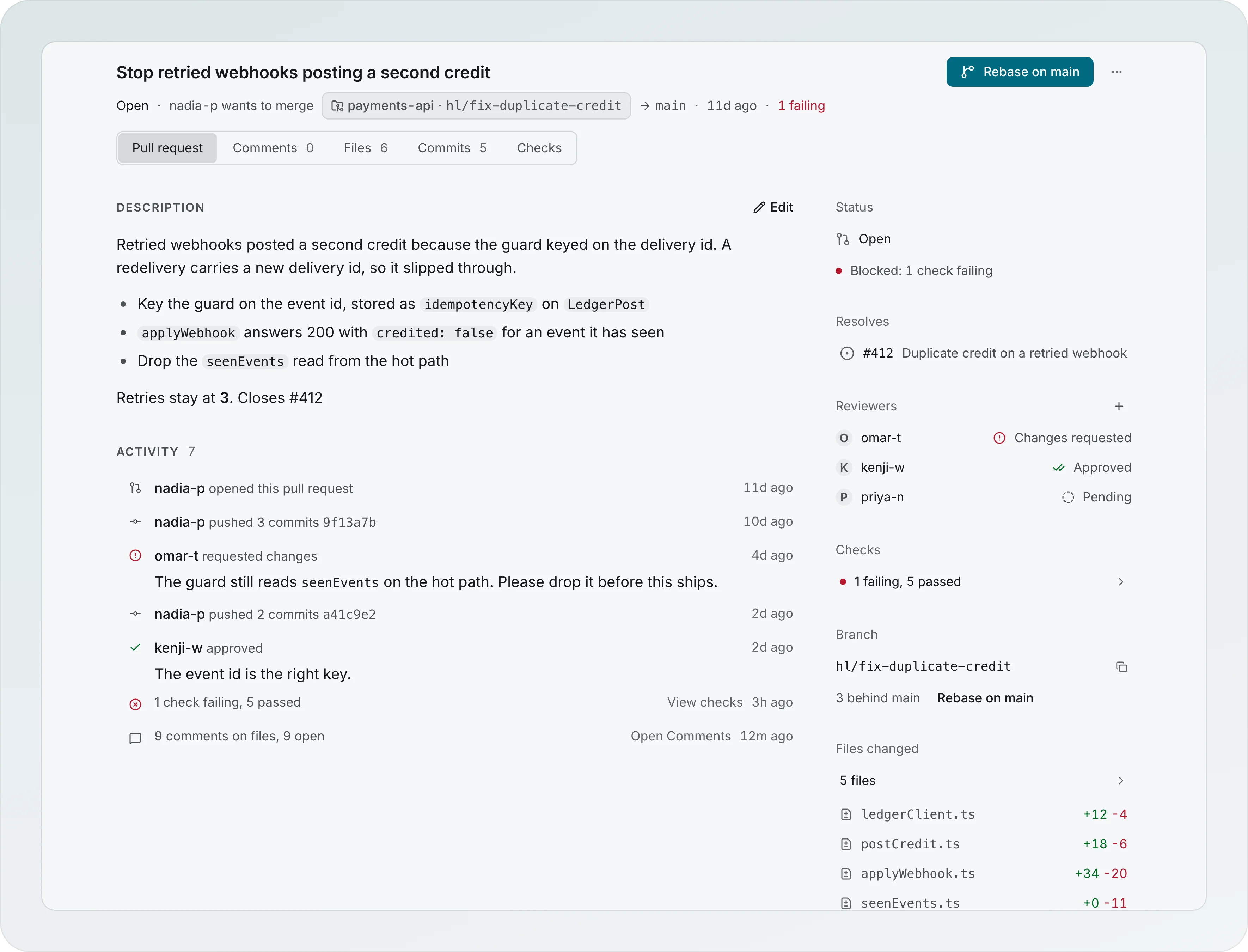
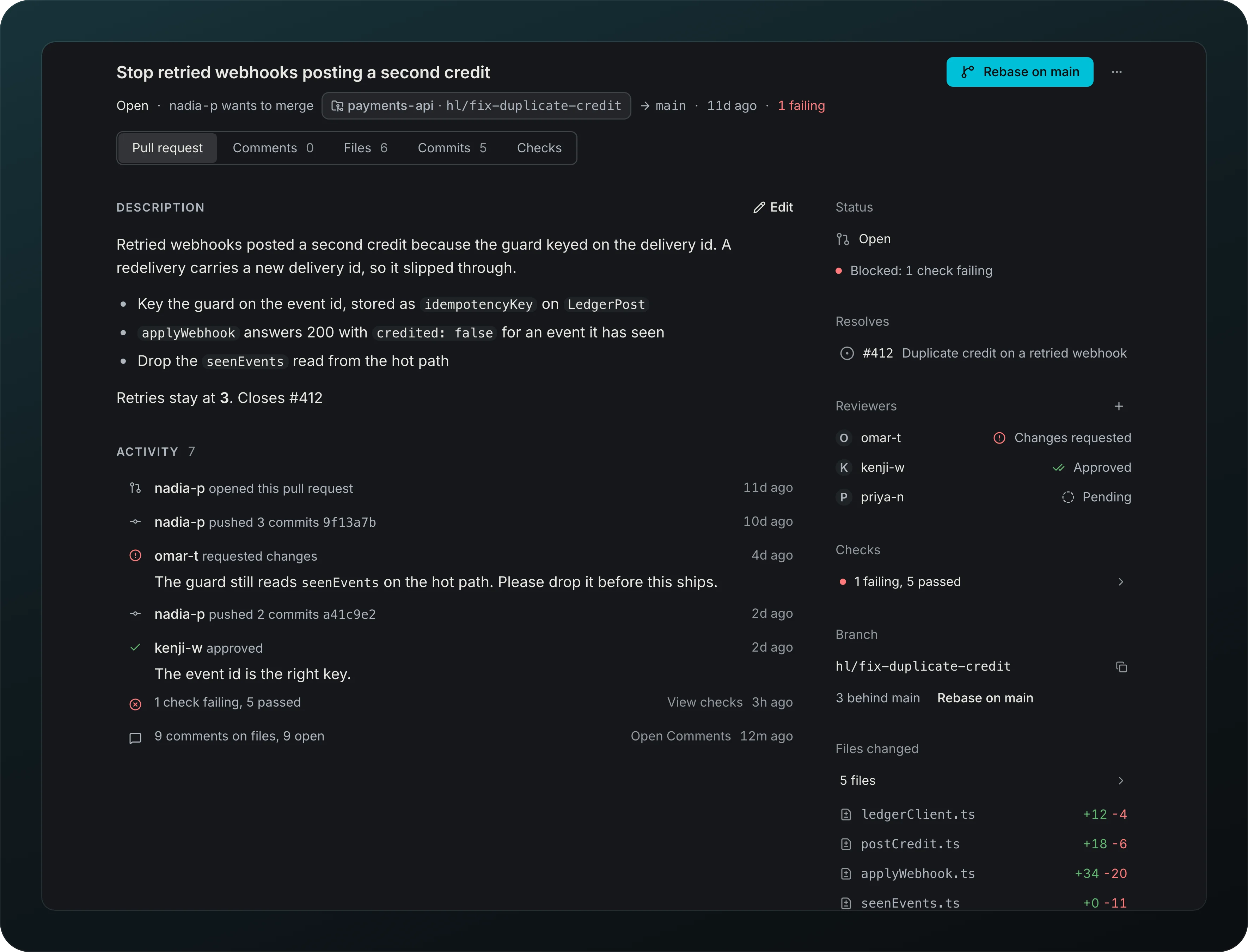
Screenshot from Goodboy 0.23.0
Read and run a GitHub pull request on its own tab, Pull request, the first tab of the Branch page. The title is the page heading: click it or press E to rename the pull request in place (Enter saves to GitHub, Esc cancels). The description sits under it, rendered, with Edit beside its heading, a Write and Preview editor and Save, and an empty one reads No description yet with Add description. Under the description, Activity lists who opened it, the pushes by day, the reviews, 4 comments on files, 2 need you (it opens Comments), the checks and your own edits. The column on the right reads Status in plain words (Ready to merge, Blocked: 2 checks failing, Changes requested, Draft, not open for review yet, A run is live on this branch, Waiting on checks and review), Resolves, Reviewers with + to ask someone, Checks, Branch (3 behind main with Rebase on main) and Files changed. A branch with no pull request reads No pull request yet with the create form, and a branch that has one lands on this tab. A Bitbucket pull request uses the same page and the same words, read and written through Bitbucket: rename it, edit the description, add a reviewer from the workspace members with +, and read the checks from its commit statuses. Merge offers Squash and merge, Merge commit and Rebase and merge, and Bitbucket checks that it can merge when you press it, so a green pull request is never held back by a guess. Close declines it, and the confirm says Bitbucket can't reopen a declined pull request. Bitbucket has no draft pull requests, so there is no draft control. A Bitbucket branch with no pull request reads Create the pull request on Bitbucket, it appears here with Open Bitbucket. If the API token is missing the pull request scope the tab says so and offers Open Bitbucket settings. Merge, mark ready, convert to draft and close from the Branch header. The header shows the title, the state, who wants to merge head → base and the checks, and its one primary is the next step, such as Ready for review on a draft, Push N, Create PR or Merge. When the primary is blocked, the header says why in its meta line, such as 1 check still running. beside the disabled Merge. Merge is the filled primary only when the pull request is ready; while comments wait for you or a fix run is live it turns secondary and counts, Merge · 3 open, and never locks. Merge asks which way, Squash and merge, Merge commit or Rebase and merge, and shows a way the repository turned off disabled with its reason. Close confirms right under the header. The Checks tab reads one line, such as 2 failing · 1 running · 9 passed, then lists the CI runs grouped as Failing, Running, Passed and Skipped, each opening its log on GitHub, and Fix failing check starts an agent on a failing one. While Goodboy reads, the line says Reading checks. A pull request nobody has reported on yet reads No checks have reported on this pull request yet, with View on GitHub. If the GitHub access Goodboy uses can't read checks, the tab says so and names the repository, then gives the fix for that access: Give the token read access to checks and commit statuses with Open GitHub settings for a token bound in Settings, or gh auth refresh -s repo to copy for the gh login, and Check again. Any other failure reads Couldn't read checks with Retry and Details. The reviewers and review requests still show when checks can't be read, and Merge stays blocked with the reason Checks unknown. Without a pull request the tab reads Checks run once the pull request exists with Create pull request.
A GitLab merge request uses the same page, with GitLab's words. The tab reads Merge request, the header MR !42, and Open on GitLab opens it. Rename it, edit the description, ask reviewers with + (it searches the project's members), mark it ready or convert it to a draft (Goodboy adds or takes off the Draft: prefix of the title), close it and reopen it from the Branch header. Merge asks which way, and offers only what the project allows: a way the project turned off shows disabled with Set by the project. The Checks tab lists the jobs of the latest pipeline, such as lint, unit tests and deploy preview, and a job allowed to fail never counts as failing. If the GitLab token Goodboy uses lacks the api scope, the page says Goodboy can't read this merge request (or Goodboy can't read pipelines on Checks) with Give it the api scope, Open GitLab settings and Retry; any other failure reads Couldn't read the activity with Retry and Details. A GitLab branch with no merge request reads No merge request yet over the create form.
One trail to the Branch page
Reach a branch from any door and land on the same place. The palette, a notification, a chat card and the board all open the Branch page with the same trail, such as Session, Branch, Comments. Up is the crumb on the left and Back walks your history. Every tab sits on one centred column, so nothing moves when you switch tabs, and a branch chip in the header switches branches or starts a new one. There is no separate pull request, Diff or Review page.
Write it
Get a pull request title, description and changelog entry in your repo's format when you open a pull request. Goodboy then pushes the branch and opens the pull request with that text. If a step fails, the reason shows where you clicked, next to Retry, and the text is kept on the Scribe's page under Pull request text. Linked issues become closing references.
PR description follows the push
Keep a pull request description in step with its branch. After a history push, a description Goodboy wrote is updated to match, unless you edited it.
Read the code
Screenshot from Goodboy 0.23.0
Read the branch against its base on the Files tab, with syntax colors, word-level highlights, a Unified or Split view (under Display; Split needs room for two columns of code, so a narrow window shows Unified and says Split needs a wider window until there is room) and a Viewed tick per file (1 of 3 viewed here), and quote a line into a note or a question for an agent. A note shows under its line with Close note and Delete; fixing it happens in the Notes drawer. A note stays on its branch: it never reaches a running agent by itself and never counts as the answer to one of its questions. To put lines in front of an agent now, write in the note box and choose Ask agent instead of Add note: the agent's conversation opens in a drawer on the right with the lines in its message box, with their file and line numbers, quoted, and your text under them; the diff stays where it was, and nothing is saved as a note. A note box opens right under the line you clicked, across both halves in Split, and Esc or saving puts you back on that line number. The tab has no Fix and no Push: the Branch header offers the next step for the branch, such as Rebase on main, Push N or Create PR. One line above the code says what you compare, such as Comparing main ← hl/fix-duplicate-credit · All 3 commits, and Display holds Unified, Split and Wrap long lines. A file tree in a rail on the left, outside the page column, lists the changed files by folder with their counts, a ring on each folder that fills as you mark its files Viewed, a check on the ones you viewed and a dot on the ones that changed since. A click jumps to the file in one continuous diff. Type in the filter above the tree to narrow the files, turn on Unviewed or With notes, or group the tree by kind. Generated files, such as lockfiles, wait in a closed Generated row at the bottom. Comment on file on a file header, or on its row in the tree, leaves a note on the whole file, with a pull request or without one. Keys: J and K (or [ and ]) move between files, H and L close and open the folder, V marks the file viewed and goes to the next one, N goes to the next unviewed file, F focuses the tree, / or T the filter, and ⌘⇧B folds or opens the tree. The rail never moves the diff: on a wide window it stays open beside the page, on a medium one it rests as a thin strip with the progress ring, and on a narrow one it is a Files 1/6 button before the comparison line; the strip and the button open the tree over the diff, and Esc or a click outside closes it. A big change keeps the tree light.
Write review
Screenshot from Goodboy 0.13.1
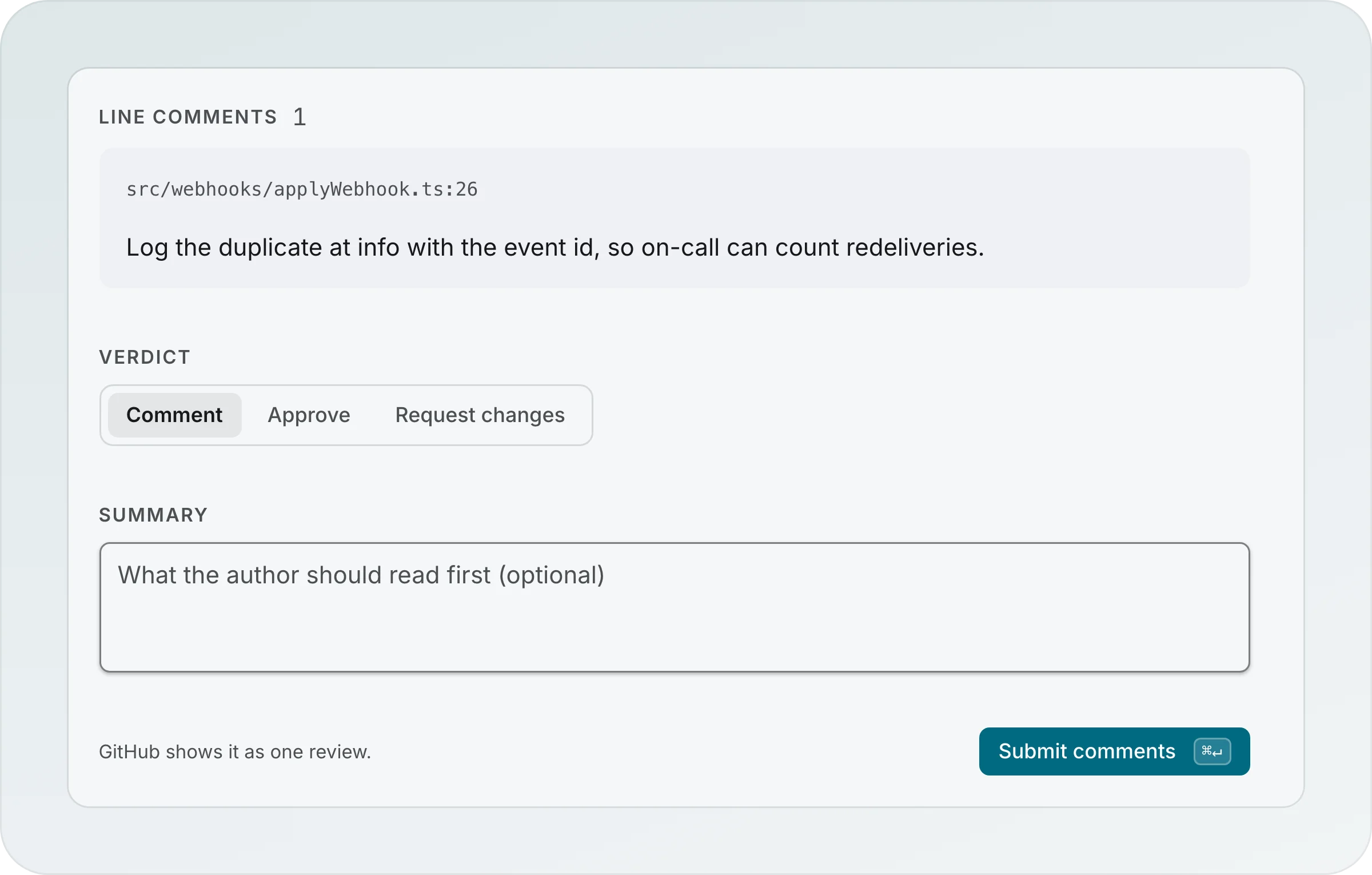
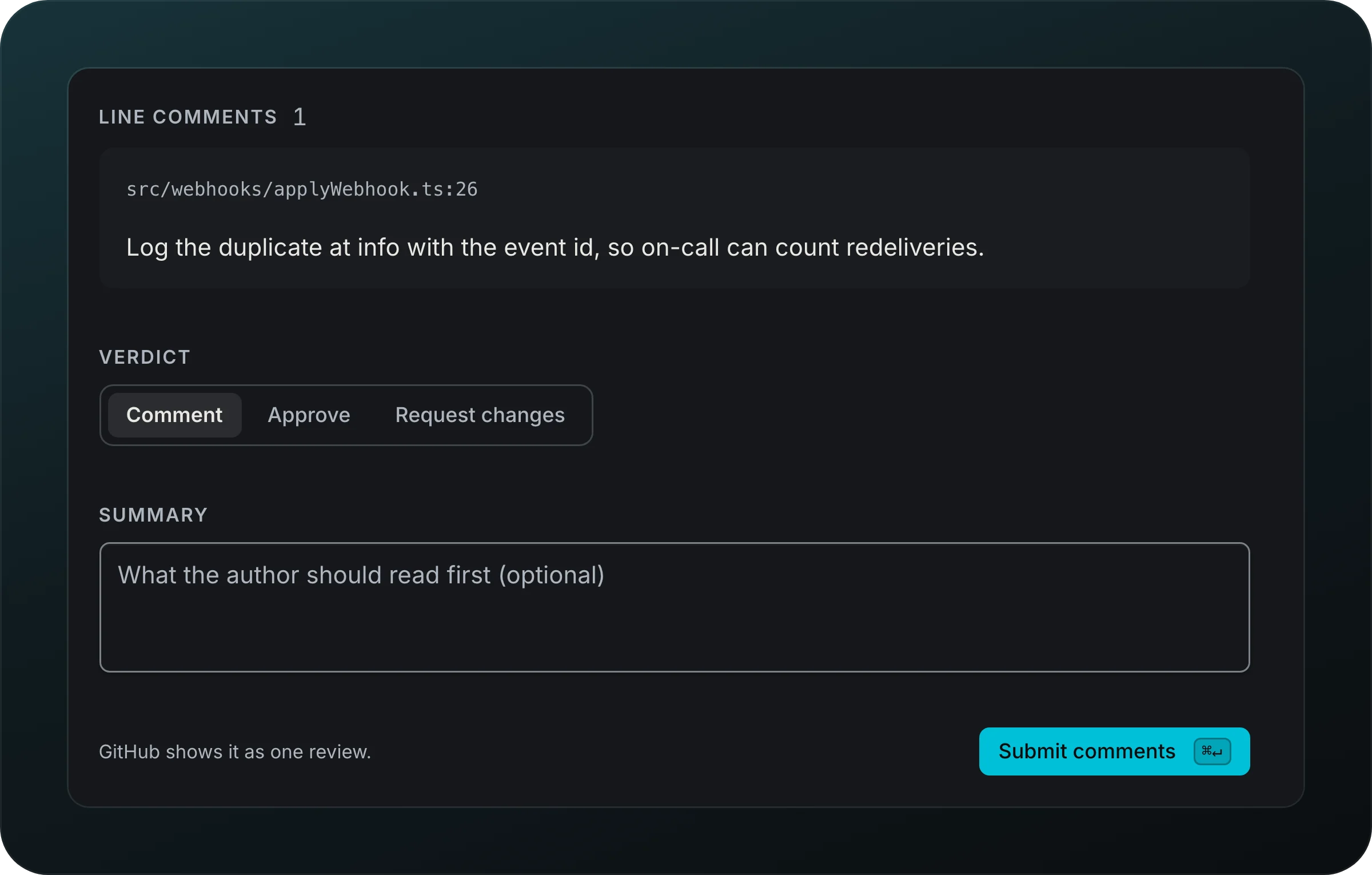
Review someone else's pull request from the diff, opened with Write review on the Files tab: click a line number to leave a line comment right under it, then press Review in the diff toolbar (it counts your line comments) for a panel that hangs under it. The panel lists your Line comments, a Verdict (Comment, Approve or Request changes) and an optional Summary. The button at its end reads Submit comments, Approve or Request changes to match the verdict, and GitHub shows it as one review. Outdated drafts are marked Stale.
Also in this area
| Feature | What it does for you |
|---|---|
| Written by Goodboy | Comments Goodboy posts end with a line that says so, and a setting turns it off |
| Resolve again | Rereads a comment and tries the fix once more |
| Checks | The checks with durations, or why they can't be read, and a failed one becomes a Next suggestion |
Starting a fix from the notes drawer announces the run with a Follow action to its transcript, including queued runs.